Revenue insights that explain why your MRR changed
Every week OneMRR checks your Stripe, Shopify and Wix revenue for the changes a chart won't point out. Claude explains what happened, why it matters and where to look, using only numbers from your own ledger.
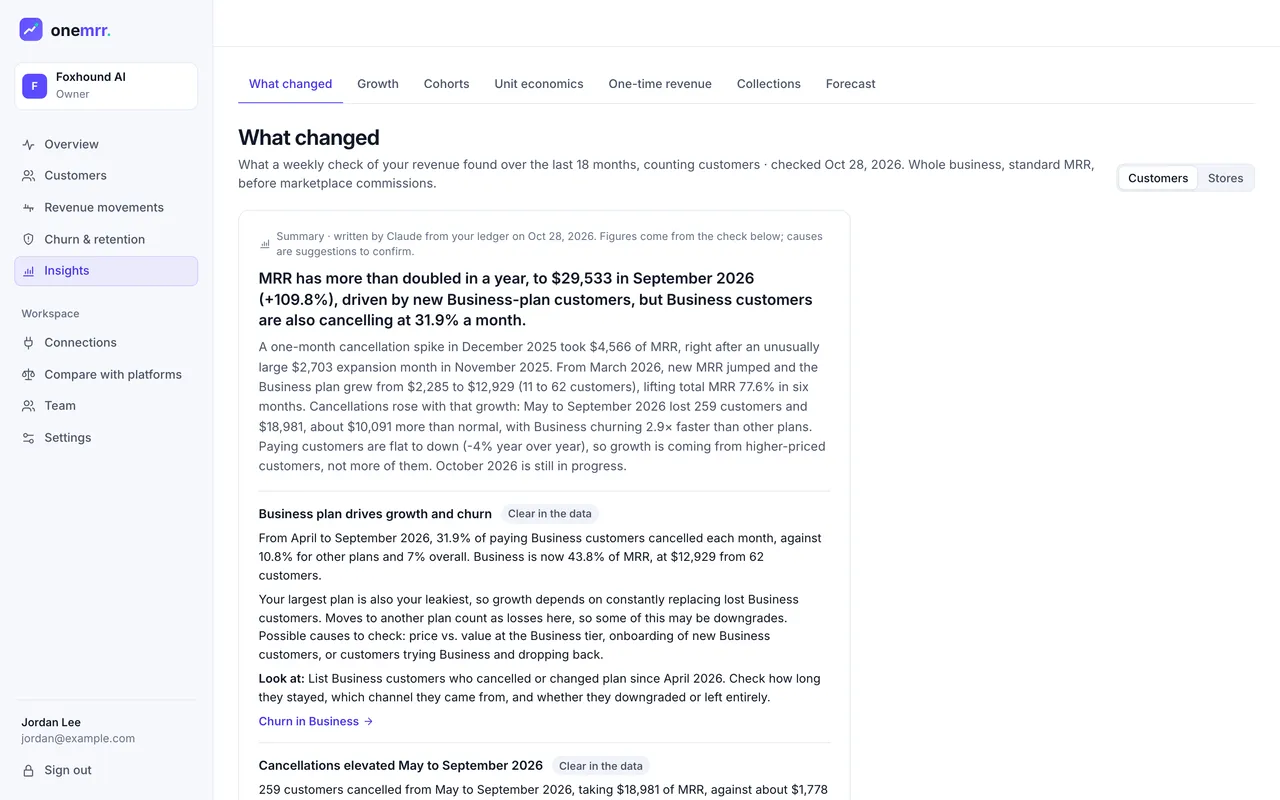
- One headline: the most important thing about your revenue right now.
- Each insight says how sure it is: clear in the data, likely, or worth checking.
- Look at: what to check first, linked to the customers behind it.
- Count customers, or your own unit such as stores.
Churn analysis that runs itself
Seven checks, every week, over 18 months of revenue.
Each threshold comes from your own history, so a normal month for you is never judged against someone else's business.
A likely price increase
A burst of upgrades in one month while revenue per customer steps up and paying customers barely move. Price cuts are caught the same way.
Churn rising after a price change
Cancellations in the months after it, against your normal rate before it.
Customers falling while MRR holds
Paying customers dropping faster than MRR, the decline that upgrades and higher prices can hide.
Months of high cancellations
A one-month spike, or a run of months well above your usual churn.
MRR shrinking month after month
A streak of months where MRR went down.
New business down on last year
New MRR against the same months a year earlier.
A plan, platform or channel falling behind
One segment losing customers faster than its peers, or shrinking while the rest of the business grows.
And when nothing is unusual
It says so: no price changes, churn spikes or segments falling behind. No story invented to fill the page.
Every finding says what moved and where to look.
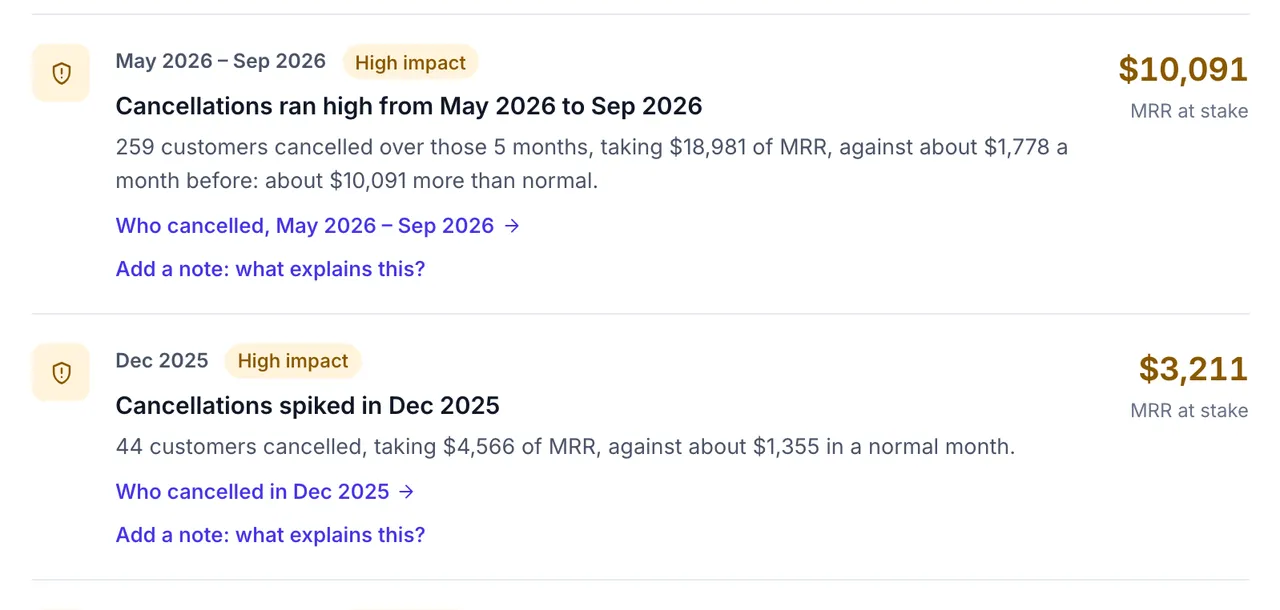
Largest impact first, with the MRR at stake. Each one links to the customers who cancelled, upgraded or moved that month, so you go from the number to the names in one click.
- Add a note when you know why: “We raised prices by $5 on every plan.”
- Notes feed the next summary and every answer, so the reason travels with the number.
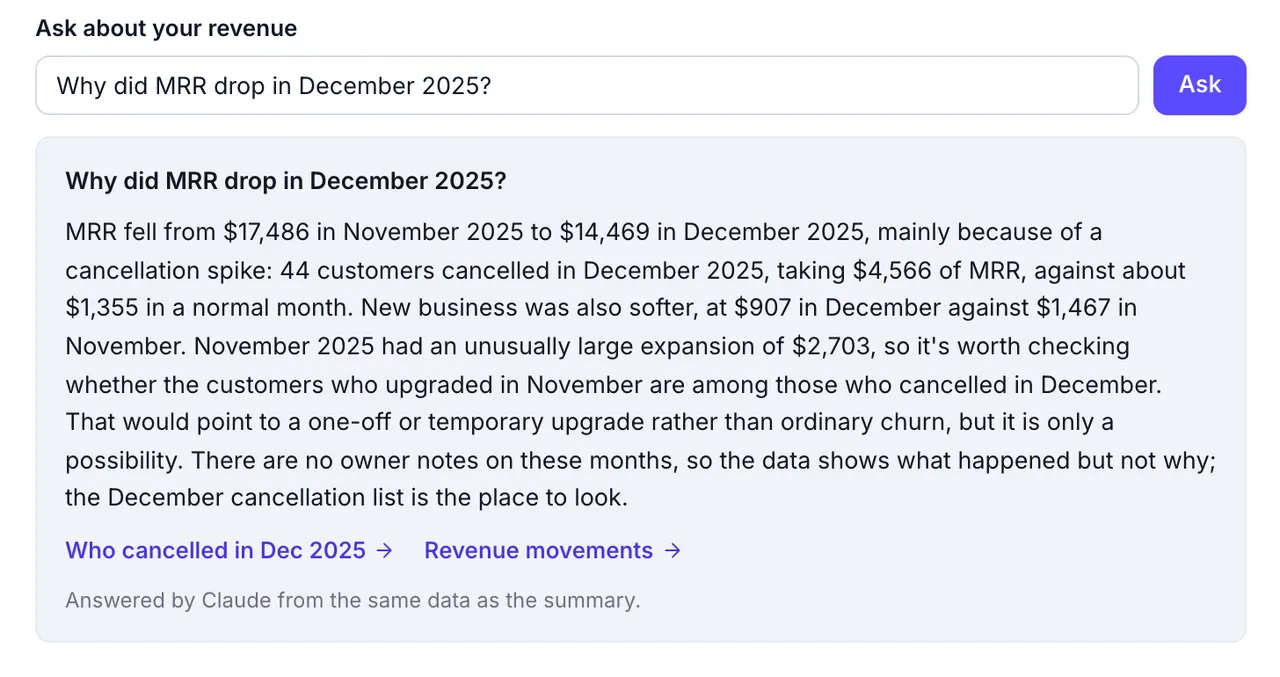
Ask about your revenue
Why did my MRR drop? Ask, in your own words.
Claude answers from the same data as the summary, names the months, and links to the views that show it. When the data can't answer, it says so instead of guessing.
The reason sits next to the number.
Changes the check finds, and the notes your team adds, show as pins on the Overview revenue trend and on Revenue movements. Anyone looking at a dip sees what caused it.
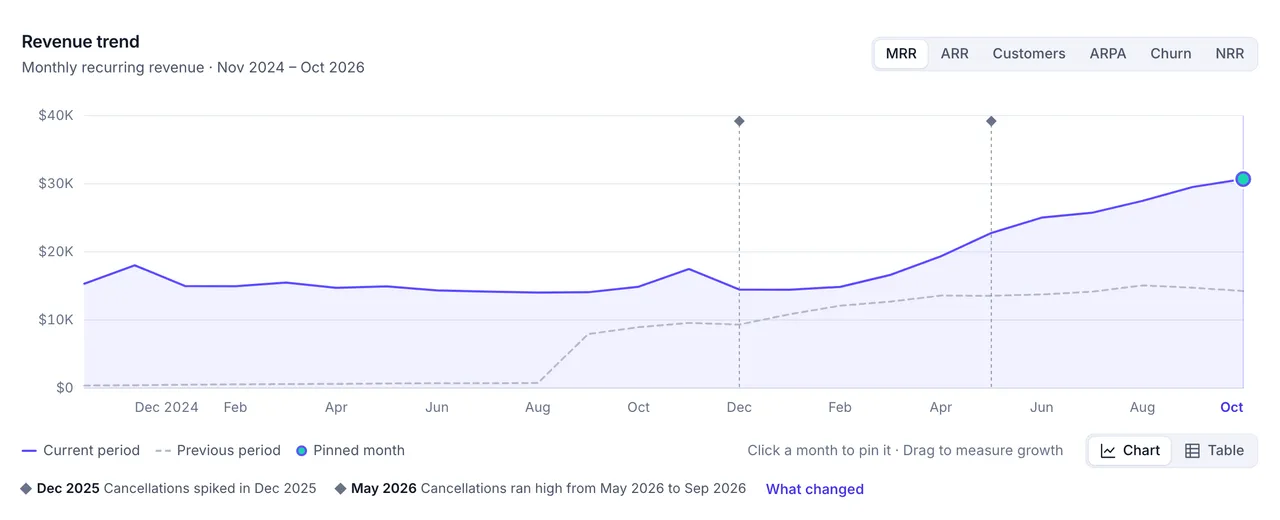
- A pin marks each month the check flagged, or a note was added.
- The pinned months in words, linked to What changed.
Numbers you can check
- Arithmetic finds, Claude explains. The checks run on your ledger. Claude ranks and explains what they found, and never calculates a figure of its own.
- Every figure is verified. A number in the text that isn't in the data gets the text rewritten once, then dropped.
- Causes are suggestions. Insights are labelled clear in the data, likely, or worth checking, until a note of yours says why.
- Totals only. Claude sees monthly totals, segment names and your notes. Never customer names or emails.
What else it covers
The check, findings and pins are on every plan, Free included. Claude's summary and questions come with Launch and Growth: 50 questions a month on Launch, 300 on Growth.
What changed is one tab in Insights. The others track growth, cohorts, unit economics, one-time revenue, collections and a forecast.
For the customers behind the trend, Churn Signals flag paying customers whose activity is falling, and retention emails follow up in your brand.
Questions
How is this different from a churn dashboard?
A dashboard shows the numbers and leaves the reading to you. What changed reads them for you every week: it finds the months and segments that moved unusually, says by how much, and links each finding to the customers behind it. The dashboard is still there when you want to dig in.
Can it tell me why my MRR dropped?
It tells you what moved and when, such as a cancellation spike or a plan losing customers faster than the rest, and suggests causes to check. Causes are labelled as possibilities, not facts. When you know the reason, add a note to the month and it's used in later summaries and answers.
Does Claude make up numbers?
No. The checks are plain arithmetic over your ledger, and Claude only explains and ranks what they found. Every figure in its text is compared with the data it was given. If a number doesn't match, the text is rewritten once and dropped if it still doesn't.
What data does Claude see?
Monthly totals, the findings, segment names such as plans and channels, and the notes you pinned to months. No customer names or email addresses are sent.
How often does the check run?
Every Monday, and when you open What changed and there's no report from the last week. Each report covers the last 18 months, for the whole business, in standard MRR before marketplace commissions.
Which plans include it?
The weekly check, its findings, the pins on your charts and notes are in every plan, including Free. Claude's weekly summary and Ask about your revenue come with Launch, with 50 questions a month, and Growth, with 300. Questions are fair use and reset on the 1st. Compare plans
Does it work for Shopify and Wix apps?
Yes. It runs on the same ledger as the rest of OneMRR, across Stripe, the Shopify App Store, the Wix App Market and your other sources, and it can compare them with each other. Wix MRR is estimated from payout exports, so findings about Wix inherit that estimate.
Know your revenue.
Keep more of it.
Connect your first billing platform in a few minutes. Free forever on the Free plan, no card needed, and every connection is read-only.