Beyond the Shopify Partner Dashboard
Shopify tells you what your app earned and how many stores have it installed. OneMRR turns the same Partner API data into MRR, churn and the shops behind every change, next to your Stripe and Wix revenue.
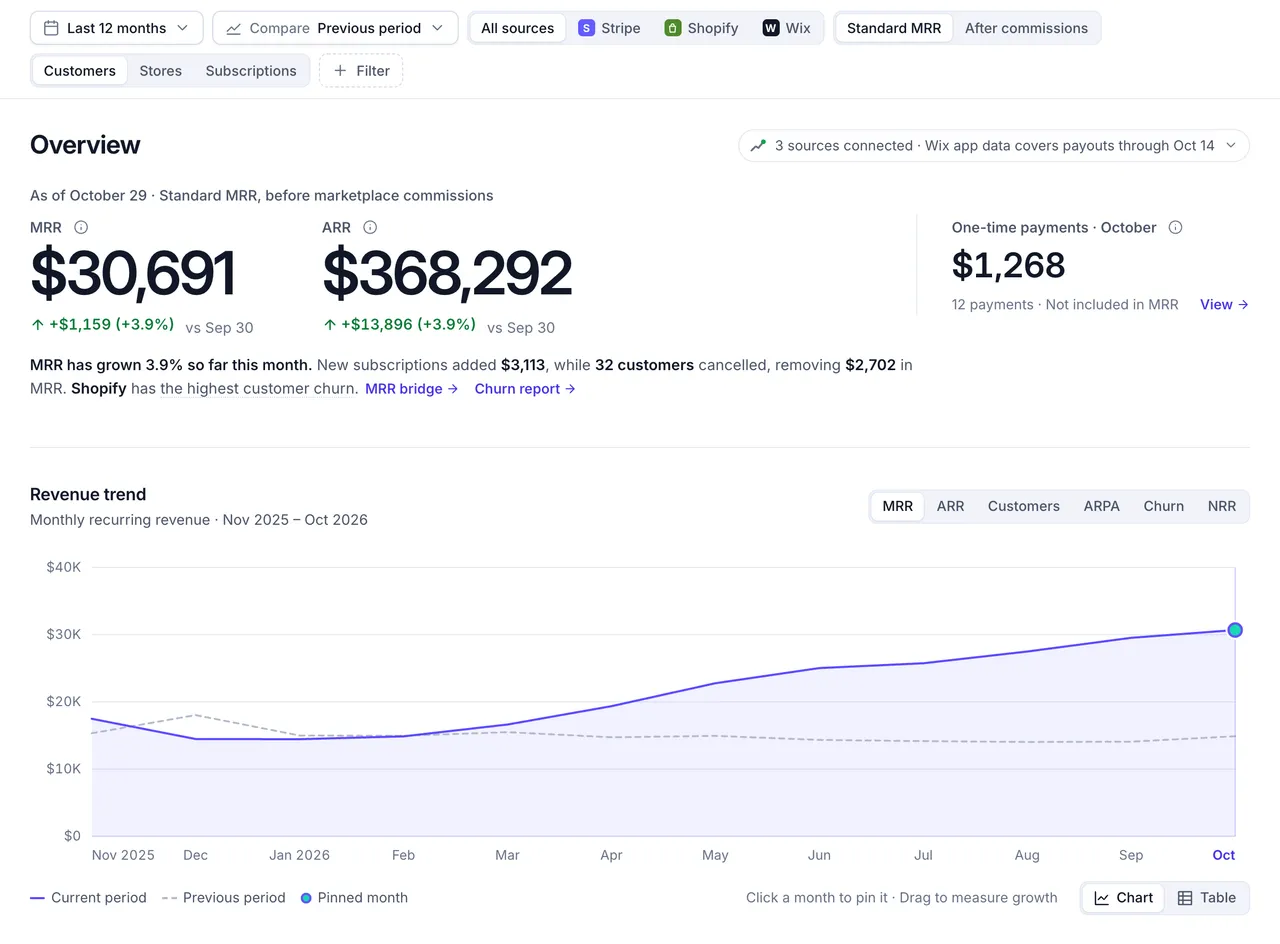
- Shopify, Stripe and Wix in one MRR, or one platform at a time.
- Before or after Shopify's revenue share.
- Which platform loses the most customers, in plain words.
- One-time and usage charges, kept out of MRR.
What the Partner Dashboard shows
Earnings and installs, not how your business is doing.
The Partner Dashboard, and the Dev Dashboard Shopify has been moving apps to since September 2025, report what you were paid, how many stores have your app and every app event. Turning that into MRR and churn is left to you.
| Question | Shopify's dashboards | OneMRR |
|---|---|---|
| What you were paid | Earnings, after Shopify's revenue share and app credits, once Shopify collects each charge. | Collections: every subscription, one-time and usage payment and every refund, by month. |
| Recurring revenue | Not a running figure. Earnings mix subscription, one-time and usage charges, and an annual plan arrives as one payment. | MRR and ARR, with annual plans spread over 12 months and one-time charges kept out. |
| How many paying shops | Merchants with your app counts active stores, including trials, staff stores and development stores. | Paying shops only. A shop counts from its first paid bill, so trials never inflate the number. |
| Why revenue changed | An event log of charges activated, cancelled, frozen and uninstalled, newest first. | Revenue movements: new, expansion, reactivation, contraction and churn MRR for every month. |
| Which shops cancelled | In the app history log or a CSV export, one event at a time. | A list for any month, largest first, with plan, date and MRR lost, linked to each shop's history. |
| Stripe and Wix revenue | Not included. | In the same MRR, with each platform's share. Wix is estimated from payout exports. |
Shopify's side is from its own documentation, checked October 2026: Track app earnings and history and the Partner Dashboard and Dev Dashboard.
Revenue movements
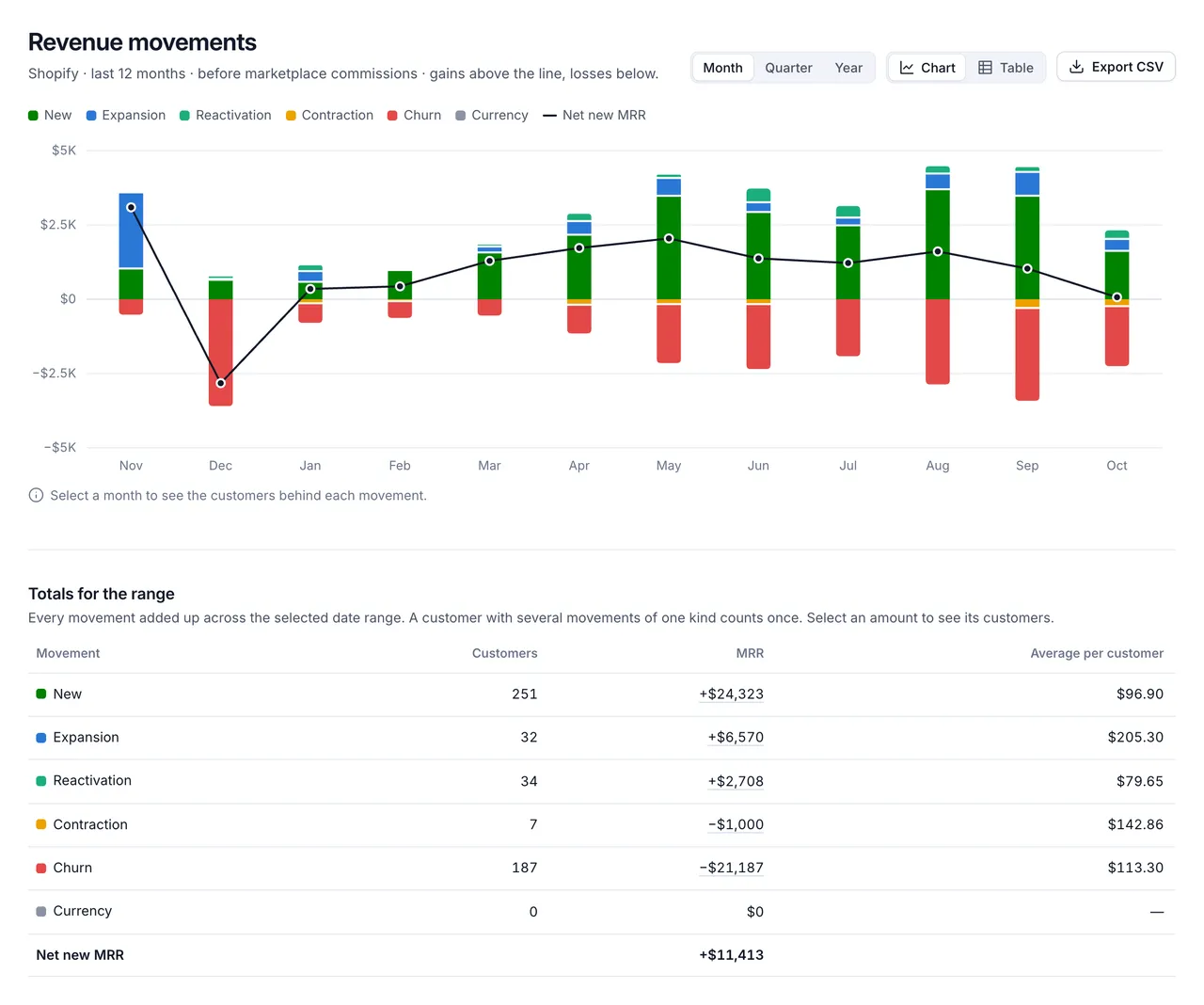
See what moved your Shopify MRR each month.
New shops, upgrades, returning shops, downgrades and cancellations, each as MRR, so a flat month never hides a busy one.
- A shop switching plans is an upgrade or downgrade, not a cancellation and a new customer.
- Cancelled, expired, frozen or uninstalled ends a shop's MRR. Unfrozen brings it back.
- Select any month for the shops behind each number.
Churned shops
Know which shops cancelled, and what they paid.
Every month's cancellations, largest first, with the plan, the date and the MRR lost. Select a shop for its whole history: when it started paying, every plan change and when it left.
- Each shop is listed by its store name and myshopify.com address.
- The Churned tab in Customers keeps every former shop, searchable and sortable.
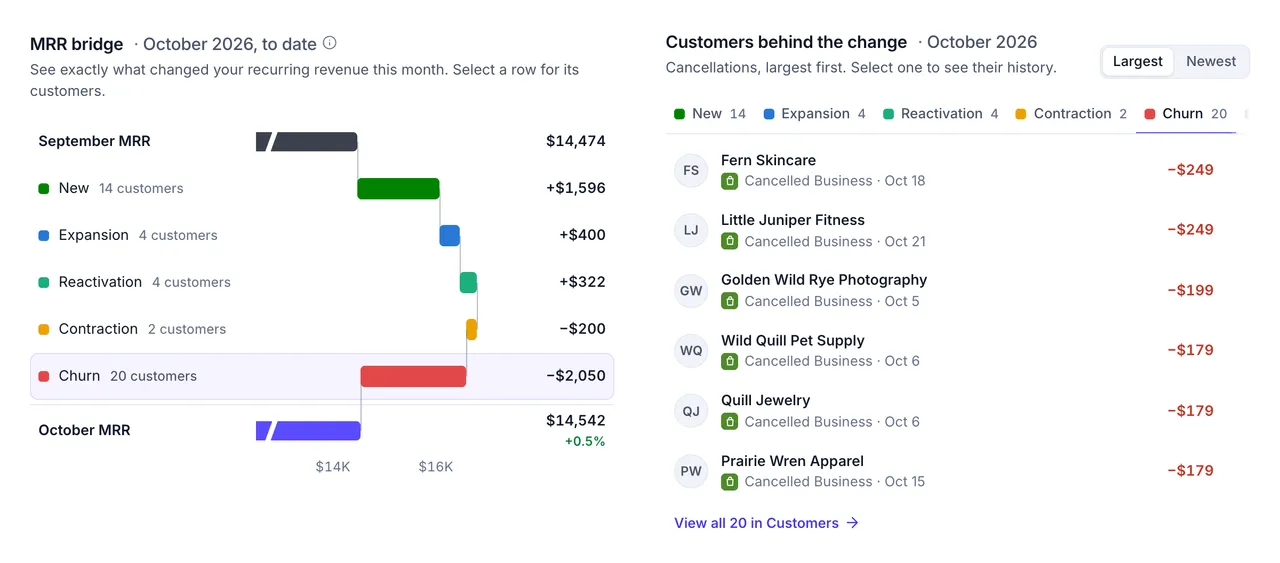
- This month's cancellations, one tab away from new shops and upgrades.
- The plan each shop cancelled, and when.
Connect your Shopify app
- In your Partner Dashboard, create a Partner API client with View financials and Manage apps.
- In OneMRR, add a Shopify connection with your Partner organization ID, the API token and your app's ID, the number in its Partner Dashboard URL.
- OneMRR reads your app's full history of events and transactions, then checks for changes every 10 minutes.
Each Shopify app is one connection. The Free plan includes two, so one Shopify app and your Stripe account cost nothing.
How the numbers work
- A shop is a customer. Its MRR is its plan's price, from the first paid bill.
- Gross or net. Standard MRR is before Shopify's revenue share. After commissions takes off the share and processing fees, measured from your own transactions.
- One-time stays one-time. One-time and usage charges show under Insights › One-time revenue, not in MRR.
- Test charges are left out, and so are free plans.
Every week, What changed checks for churn spikes and plans falling behind, and Churn Signals flags paying shops whose activity in your app is falling.
Questions
Does the Shopify Partner Dashboard show MRR?
Shopify's dashboards report earnings and revenue: what your app was paid after Shopify's revenue share, fees and refunds. That's cash, not recurring revenue. It includes one-time and usage charges, counts an annual plan in the month it was paid, and moves when Shopify collects rather than when a shop subscribes. OneMRR works out MRR from the same Partner API data.
Why doesn't my OneMRR MRR match my Partner Dashboard earnings?
They measure different things. MRR is the monthly price of every paying subscription right now, before Shopify's share. Earnings are what Shopify paid you, after its share, in the period it collected. Switch OneMRR to After commissions to see MRR after Shopify's revenue share and processing fees, measured from your own transactions.
Do free trials count?
No. A new charge only counts once Shopify has billed it at least once, so trials and charges cancelled before their first bill never reach MRR. A shop switching from one paid plan to another counts at once, as a plan change.
How are annual plans and usage charges counted?
An annual plan counts as one twelfth of its price each month. One-time charges and usage charges, such as credit packs and overages, are one-time revenue: they show under Insights › One-time revenue, and never in MRR.
What counts as a cancelled shop?
A shop's MRR ends when its charge is cancelled, expires or is frozen, or when the app is uninstalled. If a frozen charge is unfrozen, its MRR comes back. A new charge that replaces the old one is an upgrade or downgrade, not churn.
Can OneMRR change anything in my Partner account?
No. It reads your app's events and transactions through the Partner API and never writes to Shopify. The API client needs View financials for transactions and Manage apps for app events.
Can I email shops that cancel?
The Partner API doesn't share merchant emails. Send each shop's email through OneMRR's API and cancellation surveys can go out automatically. Without emails, you still see every cancellation and can share the survey link yourself.
Know your revenue.
Keep more of it.
Connect your first billing platform in a few minutes. Free forever on the Free plan, no card needed, and every connection is read-only.